Assignments is an admin/owner feature on selected plans. If you don’t see it in the sidebar, check your role and subscription tier.
Create a group
Open Assignments
Select Assignments in the sidebar.
Add a group
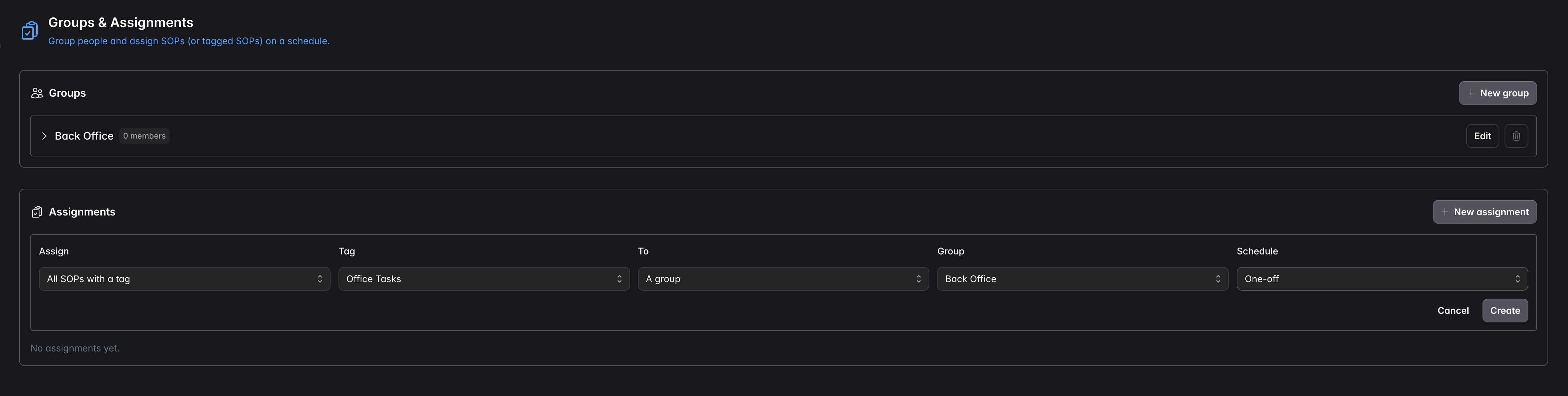
In the Groups panel, select + New group and give it a name (e.g. “Back Office”).
Add members
Edit the group to add the people who belong to it.
Create an assignment
Start a new assignment
In the Assignments panel, select + New assignment.
Choose what to assign
Assign a single SOP, or all SOPs with a tag (e.g. everything tagged “Office Tasks”).
Choose who it goes to
Assign to a group (or an individual), then pick the group.
Set the schedule
Choose a schedule — for example One-off or a recurring cadence.
Create
The SOPs are now allocated, and completions feed the audit record.
Assigning by tag to a group keeps working as procedures and people change — new SOPs with that tag are automatically covered, and group membership can be updated without redoing the assignment.